Monday, April 1, 2019

NLP in Python

NLP in Python


#importing tweeter library and textblob

import tweepy from textblob import TextBlob


#making connection with twitter

consumer_key='vBsuS1MZU1HZkcEZCF1X3RcN1' consumer_secret='BlK6sqtAxPrDWcohheZ3WleCsdzV68oilt6sHM122FfrU5gDj9' access_token='2840514410-tvwxQYYIk3WBBpALt2EnPJiSiro6oQjEk6HHPrt' access_token_secret='AdgQONrI4VpM88g6g2AZvlVAlGNwteSOYh0lBZ6Q8rd45' auth=tweepy.OAuthHandler(consumer_key,consumer_secret) auth.set_access_token(access_token,access_token_secret) api=tweepy.API(auth) public_tweets=api.search('Trump') text_list=[] sentiment_list=[] for tweet in public_tweets: text_list.append(tweet.text) print(tweet.text) analysis=TextBlob(tweet.text) print(analysis.sentiment) sentiment_list.append(analysis.sentiment)


#Saving Result in CSV

import csv
with open('text.csv','w') as f:
    writer=csv.writer(f,delimiter='\t')
    writer.writerows(zip(text_list,sentiment_list))


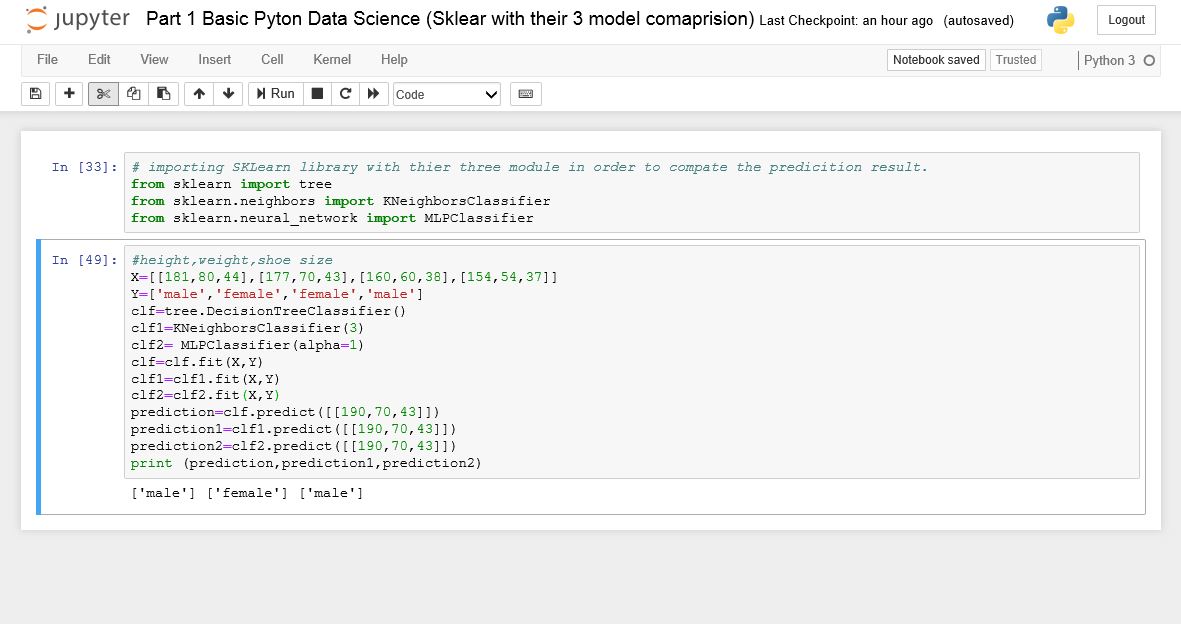
importing SKlearn library with their three module in order to compare the prediction result.

# importing SKlearn library with their three module in order to compare the prediction result.


Python Programme:


from sklearn import treefrom sklearn.neighbors import KNeighborsClassifierfrom sklearn.neural_network import MLPClassifier


#height,weight,shoe size

X=[[181,80,44],[177,70,43],[160,60,38],[154,54,37]]Y=['male','female','female','male']

clf=tree.DecisionTreeClassifier()clf1=KNeighborsClassifier(3)clf2= MLPClassifier(alpha=1)

clf=clf.fit(X,Y)clf1=clf1.fit(X,Y)clf2=clf2.fit(X,Y)

prediction=clf.predict([[190,70,43]])prediction1=clf1.predict([[190,70,43]])prediction2=clf2.predict([[190,70,43]])

print (prediction,prediction1,prediction2)

Output:


['male'] ['female'] ['male']


Tuesday, March 12, 2019

Python Tutorial - Age calculator

Python Tutorial

Input box- To get value from user, In this code below we will look at an example of saying
 hello to user after user enter his/her name
In [3]:
s=input("what is your name")
print("Hello " + s)
what is your nameRohit
Hello Rohit

Age calculator

In this programe we will look at an example of code which show the age of a user after user
 enter his/her Year of Birth.
in this example we are taking input as string and converting them in integer 
which further after calculation is being converted into sring to print the msg.
In [15]:
Years=input("What is you year of Birth")
Yearsasint=int(Years)
Age=2019-Yearsasint
print("Your Age is " + str(Age))
What is you year of Birth1989
Your Age is 30

Age Calcultor with current year function

In [17]:
import datetime
now=datetime.datetime.now()
Years=input("What is you year of Birth")
Yearsasint=int(Years)
Age=now.year-Yearsasint
print("Your Age is " + str(Age))
What is you year of Birth1989
Your Age is 30

Monday, January 21, 2019

Machine Learning Data Prediction

In this blog we will be looking at very small example of machine learning in order to understand how it work,

we have data set as per below table which have home price bases on area.

area price
2600 550000
3000 565000
3200 610000
3600 680000
4000 725000

Now , basis on this table we need to find the price of home if the area is 3200 and 5000 .

Remember we don`t have the formula as here we will be doing this with only existing data to understand ML


Thanks ,

Rohit


Believe in Work not in Words.

Thursday, January 17, 2019

Watcher on Python ( with voice )

In Today`s world we are currently getting engaged in lost of automation and AI environment whether it is an mobile app or workstations. So in the same context i am sharing Watcher method based on python lang. which can help you get voice notification with email on a change/updation of data with background activity.

Watcher is term used in guard level for keeping eye on some movement and here it doing same thing on folders /share drive/website or any thing that you relate with your creative mind.

Let`s jump on the uses/advantages:

  • we can align and run the script in background with almost 0 % CPU utilisation which can allow you work on different application without any hanging issue.
  • it will keep an eye on located section so whenever data is created or modified you will get to know by notification.
  • It uses email and voice method to inform the user.
  • You can still write code and run as this script will be running in background which make it more powerful as compared to VBA/Excel/Access macro. 


Code:


import time
import pythoncom
from watchdog.observers import Observer
from watchdog.events import FileSystemEventHandler
import win32com.client as win32
import win32com.client
speaker = win32com.client.Dispatch("SAPI.SpVoice")
pythoncom.CoInitialize()
mail = outlook.CreateItem(0)


class Watcher:
    DIRECTORY_TO_WATCH = "folder /share point path "

    def __init__(self):
        self.observer = Observer()

    def run(self):
        event_handler = Handler()
        self.observer.schedule(event_handler, self.DIRECTORY_TO_WATCH, recursive=True)
        self.observer.start()
        try:
            while True:
                time.sleep(5)
        except:
            self.observer.stop()
            print ("Error")

        self.observer.join()


class Handler(FileSystemEventHandler):

    @staticmethod
    def on_any_event(event):
        if event.is_directory:
            return None

        elif event.event_type == 'created':
            # Take any action here when a file is first created.
            print ("Received created event - %s." % event.src_path)
            pythoncom.CoInitialize()
            speaker.Speak("Hello, it works!")
            outlook = win32.Dispatch('outlook.application')
            mail = outlook.CreateItem(0)
            mail.To = 'your email id '
            mail.Subject = "New file updated" + event.src_path
            mail.Body = "text you may like to add"
            mail.Send()


        elif event.event_type == 'modified':
            # Taken any action here when a file is modified.
            print ("Received modified event - %s." % event.src_path)


if __name__ == '__main__':
    w = Watcher()
    w.run()

How to use:


  1.  copy and paste the code on notepad and save as "program_name.py"
  2. create a batch script to run this application on dos directly
  3. save this batch file in you computer startup folder.


Thanks,

Keep Learning


Rohit
Believe in work not in words

Monday, December 10, 2018

Data Miner (ver1.0) - Converting and Consolidating unstructured data into structure data.

Data Miner (ver 1.0) - Converting and Consolidating unstructured data into structure data.

Present days most of the companies are working on Data Lake concept to consolidate there existing data bases which are residing in there sub units or department or  process.

In term of consolidation most of technique include SAS , macro or automation,RPA
where SAS & RPA  is not being used by every company so there are cases where automation ,macro are now being written by developer to consolidate all data but again that time consuming .

In order to simplify all aspect and work i have build a solution to eliminate time consuming macro writing (automation) for consolidation and refining all unstructured data at no cost because it is absolutely free...

*Here unstructured data mean is where you don`t know where is the header in the whole worksheet or any type of database but what you know is the name of column name or data schema.  


Today on 10th Dec 2018 i am launching this tool in public which i have build this tool on python which again platform independent, so go ahead and try it and let me know if you require any amendment as per your requirement.


Check our demo on YouTube: https://www.youtube.com/watch?v=roSMoHu8qZU


For any update or queries please email of comment....


Believe in work not in words
Regards,
Rohit


How to Use:

Step 1: Browser the folder
Step 2: Start Mining


Tuesday, December 4, 2018

Outlook Attachment Downloader ver 1.0 (OAD)- Python (In-dependant

OAD- Outlook Attachment Downloader (ver 1.0)


Another general purpose tool  i.e. absolutely free for all !!!!

In most of the daily work environment we use MS outlook to send/receive email with attachment in
which we might need to save specific attachment in folder one by one .

In our case we were facing that above mentioned issue which we generalise to base level where user can extract or download attachment in a user specific folder and with specific subject text or contain text.


Today i.e on 4th Dec 2018 i am sharing the tool in public to request there feedback.

so please go ahead and download this tool using mentioned link and after using it just share your response i would be happy to receive feedback.

To Download Click here --->  https://github.com/RohitKankhedia/OAD.git


Believe in work not in word

Rohit Kankhedia


JOB in 2019

Automated - Digital One o One Meetings- An Idea

                                            Automated - Digital One o One Discussion                                                       ...